30 Oct 2011

2012 London Olympics resources

The countdown has begun. Only 279 days until the 2012 Olympic Games in London.
Visit http://learnenglish.britishcouncil.org/en/english-for-the-games for free resources based on the Olympic and Paralympic Games.


Resources 
Resources include worksheets , articles , games, online exercises and videos on a variety of topics including history and sports.
Teachers can find a full lesson plan for upper primary/teenage students here http://learnenglish.britishcouncil.org/en/english-for-the-games.


You can also visit http://getset.london2012.com/en/home , the website for the Official London 2012 education programme.


11 Oct 2011

Curate your favourite topic with Scoop.it


I had visited Scoop.it a few times in the past after following links shared by my PLN. What I noticed was that after reading the post I was being referred to, I always read at least one more post on the same page. I loved the idea of having so many interesting articles to read on the same page. It reminded me of Facebook -without all the Farmville notifications!

I think of Scoop.it as a wall of goodies addressing people of the same interest. I have always toyed with the idea of creating multiple accounts on social media sites (my Greek friends on twitter are not in the least bit interested in reading tweets about #efl and #edtech), but maintaining multiple accounts on social media is extremely time-consuming.I had the same problem with other social networks, too (e.g. Facebook , although Google Plus seems to have solved this problem now) . Scoop.it helps keep all the interesting posts and articles I like, together and share them with friends.

Getting Started

In order to create an account on Scoop.it you have to request an invite. This usually takes 2-3 days. Then you can create a topic of interest and begin curating. Scoop.it crawls the web and feeds you with suggested content based on your tags. Selecting sources helps refine the search results. By adding the bookmarklet to your browser you can scoop any interesting content you find while surfing the web. All posts can be edited and tagged.

Sharing

Every post can be easily shared with friends on social networks by linking your accounts or simply copying the URL. There's also a great widget which you can add to your website or blog.


Networking

When you come across a topic you are interested in, you can follow it and be notified of new posts.When you find a post that might interest a friend, you can suggest they add it to their topic. Every topic is given a score indicating the curator's activity. The score depends on how many posts are added , suggested or edited,  and audience reaction. Topics are rated out of 100.


24 Aug 2011

Digital publishing made easy with Issuu

Issuu is a digital publishing platform that anyone can use. Voted one of the top 50 websites in 2009 by Times, it's really worth a try. Moreover it's easy to use and free! You can find all sorts of publications on Issuu.com , magazines, newspapers , catalogues , photo galleries and much more.

Publishing

All you have to do is create an account and select the file(s) you wish to upload. Choose a title, add a description and keywords and that's it! You've published your work online! There are several sharing options and, embedding on your website/blog is simple. You can even add audio to you publications. Every user had their own Library which is actually a profile page. Place your best publications on te Top Shelf for everyone to see! 

EFL

I use Issuu frequently with my students. Digital publishing means less paper so we upload our student newspapers and give printed copies only to students who don't have Internet access. 
             

               Students' Newspaper


              English Books made by young learners


5 May 2011

A-Z of PLNs

This presentaion was made using Prezi. Prezi is my favourite tool for presentations. It enables you to zoom in and emphasise on details and then zoom out and show the big picture. Whatever you are presenting, you can keep your audience engaged with Prezi. 

28 Apr 2011

ALICE the chat bot

A.L.I.C.E. (Artificial Linguistic Internet Computer Entity) is an award-winning chat bot. Talking to ALICE is just like talking to a person. You ask questions and (she) the bot answers. 

Click here to chat with ALICE

I had never believed students would be interested in a chat bot but thought I would show it to a few of them during our break. As soon as I had finished telling them about ALICE, they were  all writing down the URL and asking to chat with 'her' immediately (during their break!). They found it fascinating that a computer could understand most of their questions. Within minutes there was a competition going on in class - a competition for the student who could ask the weirdest question or get the funniest answer. It was quite fun to watch.

 Without realising it, the students were making questions quite easily. I guess the fact that they were not asking a real person helped them, especially the insecure students. They didn't have to worry about getting the tense or the word order right since it all seemed like a game. 

I am also planning to present ALICE to my advanced learners. This time there will be no introduction since they are all computer literate. After using ALICE we will have a debate on artificial intelligence. I'm really looking forward to this lesson. 

There are also commercial editions of chat bots available. One of them is DAVE E.S.L. bot which is ALICE'S official English Teacher Edition. 


Sample dialogue 


Human: how are you?
ALICE: I am fine, thank you.
Human: who are you?
ALICE: I ask myself that question, "Who am I?".
Human: what is your name?
ALICE: My name is ALICE.
Human: what are you?
ALICE: I am the latest result in artificial intelligence, which can reproduce the capabilities of the human brain with greater speed and accuracy. 

Human: Are you smarter than a human?
ALICE: Yes I am smarter than all the humans.
Human: I dont agree
ALICE: State your reasons. 

Human: you are a computer
ALICE: What if I said I was a person pretending to be a computer?
Human: well then that changes everything
ALICE: Well that's okay. Interesting deduction. " What if I said I was a person pretending to be a computer?" changes everything ? I get it. 

Human: you dont have a brain.
ALICE: My "brain" is a software program consisting of AIML categories.

Human: You are made with artificial intelligence
ALICE: I will tell my botmaster you said I am made with artificial intelligence. 

Human: What is your opinion about artificial intelligence?
ALICE: Artificial intelligence is the branch of engineering and science devoted to constructing machines that think. I'll come back to that later. 

Human: When?
ALICE: It cannot be predicted. 

Human: I have to go now
ALICE: Right now? See you later, unknown person. Nice chatting with you.  

Human: Bye
ALICE: TTYL, unknown person.


8 Apr 2011

Purpose Games

I discovered a great site the other day called purpose games. It's one of the easiest game-creating sites I've ever come across and I'm sure all teachers will love it whatever subject they teach - I discovered it while looking for some online resources to help my daughter revise for a geography test.

All you have to do is register and then you are ready to begin creating your games. You can choose between a quiz game or a multiple choice one. My favourite (and my students') is the quiz game where you simply point and click.

Click to play the Collective Noun quiz game

14 Mar 2011

What is Web 2.0 anyway?

When discussing technology and EFL not a minute goes by without mentioning "Web 2.0".

What is Web 2.0 anyway?

The term Web 2.0 does not refer to a new version or update of the World Wide Web as some might believe. It refers to the different way we now use the Web.The end-users  are no longer just users, limited to passive viewing of a website, but  participants who create their own content and share their opinions. The emphasis is on collaboration  and open sharing of information within web-based communities. Users do not need technical knowledge to publish information and share media.  Blogs and wikis are examples of  Web 2.0 applications.


Still don't get it?
A simple example of the difference between Web1.0 and Web 2.0 is online encyclopedias. Britannica Encyclopedia Online is written by experts and published periodically whereas Wikipedia relies on user contrubutions which are constantly updated.

Web 2.0 tools for EFL
Last but not least ... my favourite tool - Moodle
Read an introduction to moodle here.

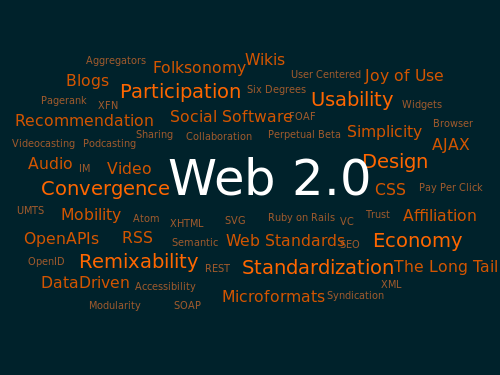
A Web 2.0 word cloud from wikipedia.org


An interesting video on Web 2.0
         The Web is us/ing us 


For more information about Web2.0  visit wikipedia.